Start here
Authentication
Connect supported provider accounts and understand model selection and billing.
View as textOn this page
Haskell Agent supports OpenAI, xAI, OpenRouter, Gemini, and Claude Code. Available models and billing depend on the credential and provider you select. A provider subscription and an API key are not interchangeable billing methods.
Connect interactively
Start agent-cli, then open:
/login
agent-cli login output from build 9a20f72, captured without connected accounts and rendered as SVG. The fullscreen login view uses different labels. Open the image for full size.Press a to open the provider chooser. Select the intended provider before proceeding to its authentication method. Press Esc to return without connecting an account.
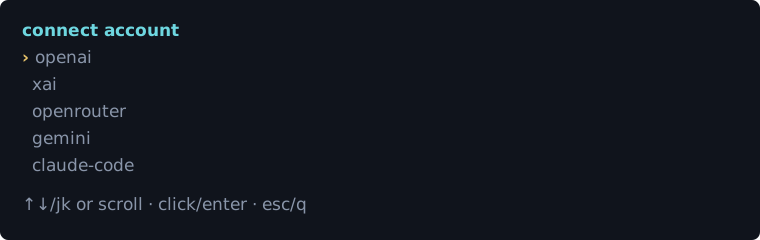
Use the login/account interface to manage provider connections. Then open /model and choose the model for your work. You can also request a configuration change without adding it to the coding conversation:
/meta connect my Grok accountMeta Console previews supported configuration changes before applying them. Enter secrets only in the host's masked prompts, not in ordinary chat messages.
Understand the account dashboard
Each account row identifies the provider, account label and identity, whether its source is managed or external, whether it is enabled, its billing mode, and available usage information. Select an account to inspect its details rather than relying on a model's description of its identity.
| Action | Effect |
|---|---|
| Refresh usage | Fetch current provider limits for the account. It does not reset the provider's quota. |
| Import credential | Copy an eligible external credential into the managed store; the external source remains a separate file or environment setting. |
| Disable credential | Keep the managed credential stored, but exclude it from selection. |
| Enable credential | Make a stored managed credential available again. |
| Disconnect credential | Delete the managed copy. This is not a provider-side revocation and does not remove an external credential file. |
External credentials cannot be enabled or deleted as if they were managed records. Change their originating environment or file, or import them to use managed-account controls. A credential may remain discoverable after disconnecting its managed copy if the external source still exists.
Connect, verify, and retire an account
- Open
/loginand add the intended provider connection. Complete browser authorization or the masked credential prompt. - Inspect the resulting account row. Confirm the account identity and billing method before sending work.
- Select a model belonging to that provider with
/model, then run/session-infoand a short generation-only request. - Use
/usageto inspect available account usage; provider reporting can be unavailable. - When retiring a managed account, disable it first if you want a reversible change. Disconnect it only when you intend to delete the stored copy.
If a secret was exposed, revoke it at the provider as well. Deleting a local copy does not invalidate a copied token. Do not include auth files, environment values, or credential store contents in a bug report.
Select a provider explicitly
To verify your connection, select a model, run /session-info, then send a small request:
Reply with one sentence confirming you received this message. Do not use tools.Expected result: the session details identify the intended model and the request receives a response. This checks basic generation, not every tool capability. A model's claim about its own identity is not a substitute for checking the session details. If authentication fails, return to /login; do not paste a credential into the conversation.
agent-cli --provider openai
agent-cli --provider xai
agent-cli --provider openrouter
agent-cli --provider gemini
Provider credential detection checks OpenAI, xAI, OpenRouter, then Gemini. Claude Code is selected explicitly rather than through automatic detection. See the provider reference for each provider's credential sources and account-selection rules.
Gemini
Choose a Gemini model in /model. When no Gemini account is connected, the CLI opens Google sign-in in your browser and stores the OAuth credential in its managed credential store. This account flow does not require an API key.
For Google AI Studio API billing, supply GOOGLE_API_KEY in the process environment (GEMINI_API_KEY is also supported), then select the provider:
agent-cli --provider geminiClaude Code
Install and authenticate Claude Code first:
claude auth login
agent-cli --provider claude-code --model sonnet
The harness uses the Claude Code SDK integration, including Claude's built-in tools and additional harness tools. Provider subscription usage rules still apply. Consult Anthropic's current SDK subscription policy; technical compatibility is not a substitute for required provider approval.
Check credentials and usage
| Command | Purpose |
|---|---|
/session-info | Inspect the active model, tools, and session details |
/usage | Show connected-account usage and reset times |
/reload-auth | Re-read provider credentials after an external change |
/model | Select a different model |
Credential failover observes account cooldowns and avoids silently converting subscription usage into API-credit spending. If available accounts cannot take over, an interactive session can wait for the provider's reset time; press Esc to cancel that wait.
Reload and recover credentials
| Active authentication | What /reload-auth does |
|---|---|
| Token-provider-backed accounts, including xAI/OpenRouter/Gemini | Forces a fresh credential checkout by rejecting the currently active credential; can select a different eligible account. Success reports auth reloaded and the selected account. |
| Fixed OpenAI WebSocket authentication | Cannot replace process-bound auth. Refresh ~/.codex/auth.json and restart. OAuth pools already rotate on handshake failure. |
| Claude Code | Rechecks the SDK's authentication status and reports its account label; it does not perform a new Claude login. |
/reload-auth re-reads credentials after an external change. It cannot alter the environment inherited by an already-running process: after changing an exported variable in your shell, start a new CLI process from that shell. For a changed auth file, reload is the appropriate first step. If a browser refresh token has expired or been revoked, complete login again rather than repeatedly retrying the same failed request.
Manual reload is different from automatic authentication recovery. Provider transports can reload or fail over after classified credential rejection, subject to their retry budget and replay-safety boundary. This is not an unlimited retry loop or permission to repeat a tool with an uncertain external outcome. If recovery fails, fix the credential source and recheck the selected account instead of repeatedly issuing reload.
A quota error and an authentication error have different remedies. A 401 calls for inspecting or renewing the selected credential; a 429 calls for inspecting usage and reset times. Account failover stays within billing constraints instead of silently spending API credits when subscription usage is exhausted.
For a custom endpoint, configure an environment-variable reference in the model catalog rather than putting the secret itself in the catalog.